
If you are a paying customer, please use the following steps to cancel your account (free users see below).
1. Log into TubeAssist.
2. Click your name in the upper right corner of the screen.
3. Choose 'Your Account' from the drop down menu.
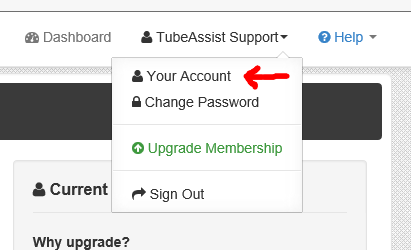
4. Click the 'Cancel Membership' button.
After you cancel your account, your account will remain active for the remainder of the time you have paid for. After that, your account will switch to the 'Free' version of TubeAssist.
For Free users, there is no way to cancel your account. Your account just sits in our system so there is no need to actually close it. If you want to remove your channel from TubeAssist, please follow the instructions at http://tubeassist.freshdesk.com/solution/articles/125214-how-do-i-remove-my-youtube-account-from-tubeassist-and-revoke-permissions-i-granted-tubeassist-to-my-channel-. If you have any further questions, please let us know.