
You can run our unsubscribe tool to automatically unsubscribe you from the channels you've been subscribed to. This is important since YouTube allows you to subscribe to a maximum of 2000 channels. If you don't use this feature, eventually you'll reach your maximum number of subscriptions and will be forced to stop using the Subscribe to Channels campaign.
To start running this tool, follow these steps:
1. Log in to TubeAssist.
2. Click on the 'Manage' button for your channel.

3. Click on the 'Subscriptions' link in the left hand navigation.
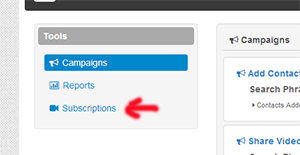
4. Turn the process 'On'. Choose the age of the subscriptions you want to remove (for example any subscription over 2 weeks old). Finally choose if you want to remove all subscriptions, or only those who haven't subscribed back to you.

On you do this, a process will run every night that keeps your subscriptions cleaned up. If you have any additional questions, please let us know.